
The QuickBooks Audit Trail is always on (since QuickBooks 2006) and records all transaction activity. However, sometimes you may want to see when users login or out of QuickBooks. This article shows how to see when users login or out of QuickBooks along with when a user creates or restores a backup file, changes the password, processes credit card transactions or accesses credit card information.
For this information to be recorded on the Credit Card Audit Trail, this feature must be enabled (Company > Customer Credit Card Protection > Enable Protection). If the company accepts credit cards with Intuit Merchant Services, the Credit Card Protection feature must be enabled. Additionally, once the Credit Card Protection feature is turned on, it cannot be turned off. This feature requires a strong password which must be changed every 90 days. Here is an example of the Credit Card Audit Trail Report (Reports > Accountant & Taxes > Customer Credit Card Audit Trail).
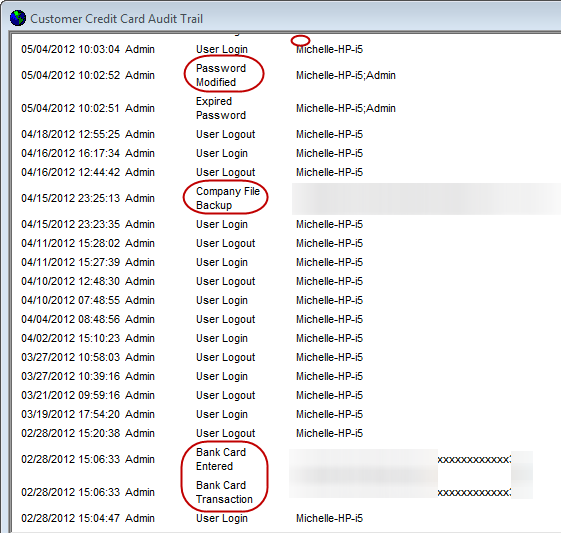
NOTE: This post applies to desktop versions of QuickBooks — QuickBooks Pro, QuickBooks Premier, QuickBooks Accountant and QuickBooks Enterprise Solutions.
Does Quickbooks track when a user logs on or off? In other words, something like the wonderful Audit Trail but that tracks logons and logoffs. I want to use this as a rough double-check for when an employee starts work in the morning. I have only ever run the desktop versions. I started with Quickbooks Pro 2013 and now have Quickbooks Pro 2016.
Thanks,
-Alex
No in QuickBooks Desktop you cannot see when users login or out. With QuickBooks Online, the Audit log does show when users login, added / edit a customer (or vendor, etc.), reconcile, etc. It shows everything and is very easy to search (unlike the audit trail in QB desktop). Just one of many reasons, I prefer QB Online to QB desktop. 🙂
This is a great tip! I just finished talking to Quickbooks Enterprise support, and they don’t even know this.
I learned something new too, thanks!!
This was a really great tip. I learned something new. Thank you for sharing.
E