
Many small businesses do not record every sale for each customer. They may not use a point of sale system, instead they may use a cash register, a specialized program (like for medical offices) or another method to record sales. These businesses need to record a summary of sales in QuickBooks. They want to know ‘How can I record daily sales’ in QuickBooks?
The types of businesses who would want to record a summary of sales in QuickBooks include these types of businesses:
- Restaurant, bakery, bar, deli, etc.
- Gift shop
- Retail store
- eCommerce with website sales
- Doctor, dentist or other medical office
- Spa, hair salon
- Many other small businesses
There are several names for recording a summary of sales in QuickBooks including a Daily Sales Summary, Zero Sum Sales Receipt, No Hassle Sales Receipt or other names.
First, you need to set up items to record sales. Determine what level of detail you want to track sales and the capacity of the register, etc. for tracking sales by category. For example you could set up items such as:
- Taxable and non-taxable sales
- By Department — men, women, kids, accessories, etc.
- For restaurants — appetizers, entrees, desserts, bar, etc.
Consider the register tape or report and how you can summarize sales and set up service items as needed. Then, set up payment items for the methods of payments accepted, such as:
- Cash/Check
- Visa/MasterCard
- American Express
- Discounts or coupons
- Gift cards redeemed
- Other
Using the register tape (Z-tape) or report with the sales information, enter a Sales Receipt in QuickBooks which should net to Zero as shown in this image (click the image to see it larger).
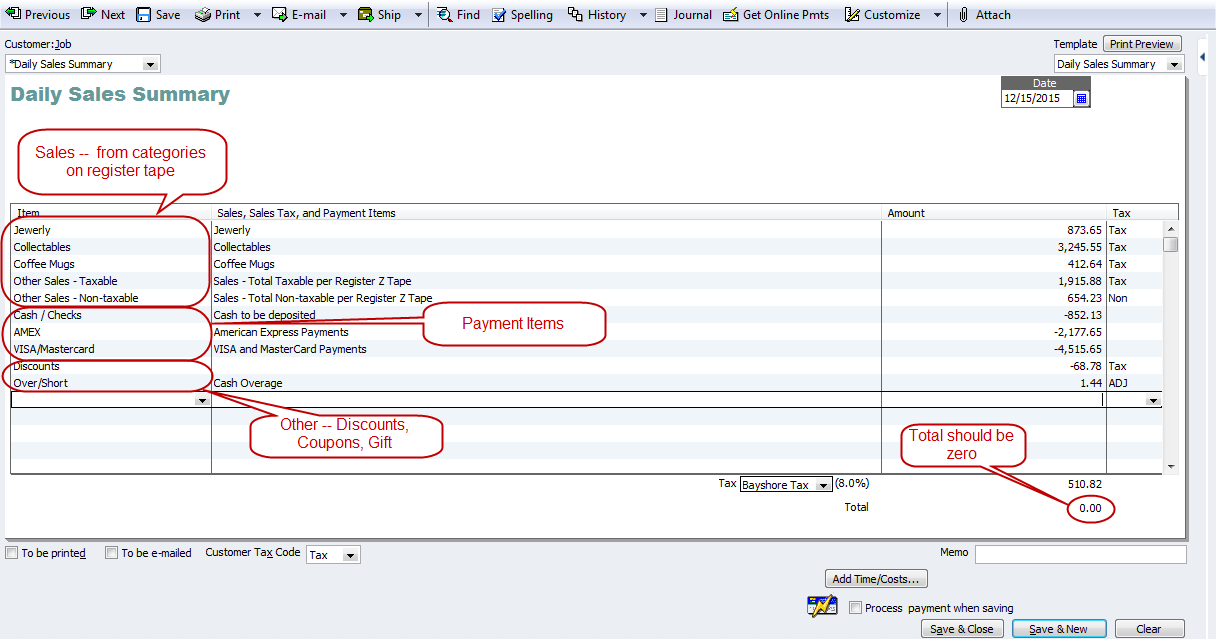
You may want to customize the Sales Receipt Template to add custom fields to track additional information (like customer counts, etc.). Memorize the Sales Receipt with zero amounts for each line. Then, you can just enter the actual amounts for each day. For more details, search QuickBooks Help for ‘Enter Daily Sales’. For restaurants, there is a detailed blog post from The Sleeter Group here.
Note: Track Sales Taxes according to the level of detail needed for the sales tax returns. For inventory, use a periodic inventory method — record purchases directly to cost of goods sold. Periodically count and value the inventory on hand and adjust to actual. Consult with your accountant or tax professional for assistance.
If you set up a zero sum sales receipt, how can you run a sales report? If I want to know how much I sold in a month, all I have is a month’s worth of zero daily sales. Please help!
You can get some reports from the POS system or whatever they are using to record sales. When you enter the Daily Sales Summary you can choose which items you want to enter and track in QB. Then, you can run a Sales by Item report to see the details.
Hi Michelle
thanks for teaching us with this useful info. I am searching for the QBO equivalent article of yours for POS , restaurant Sales receipt.
I have created a zero sum Sales receipt for QBO, (Canada), the QBO dash board shows -ve sales equivalent to the Sales tax amount.
Was an answer found for the QBO equivalent?
You can do create a daily sales summary in QBO too. You need to set the payment items up as a service item and enter them as a negative amount on the sales receipt so it nets to zero.
How do you account for Change that is added to the drawers at the end of the day? I think I have it all set up correctly up to that point. But I need to make a note of change that was needed to refill the money drawers.
Many people set up an account for ‘Cash in Drawer’ as a bank account and the amount usually doesn’t change. For example, you start with $250 of cash in the drawer and you always leave that amount in the drawer to start the next day.
Hi Michelle, Thanks for your post. It is the most comprehensive of any I’ve read. I have been using QB since the 1990’s by using QB as my cash register, it has been working great. However, we have now subscribed to an online scheduler and point of sale system that we will be using as the cash register and will be entering daily summaries. I have set up my items and payment items exacty as you suggested in your article, but our daily sales receipt is off by exactly the sales tax amount. I tried to enter a sales tax group but QB did not allow me to pull it up as an item in the sales receipt. I tried to use the discounts item but now my total sales are under stated. Any suggestiong would be greatly appreciated.
I am trying to put the monthly sales for a gas station into quickbooks without a customer. Is this possible. I am not sure how to go about the monthly sales
Does anyone have any idea on how to handle this. I am very confused about this and entering sales receipts but I do not have any customer to place it to.
Any help would be greatly appreciated.
Create a customer called monthly sales. Try following the method described in this post.
Hello, I got some refund from Hotels, what account should I reconcile these refunds to?
I use a daily sales summary. We rang up a refund for a customer through the POS system as a cash refund, but need to issue a check to the customer. We don’t usually do refunds so I have no idea how to do the check! Thanks.
Hi,
I was going through the daily sales report, but , please help me to create a daily sales and customer walk-in report.
Looking forward for your help
Regards,
Taracis
I’m not sure how you track walk ins vs. others? You may need to create custom fields to track it. Go to http://www.findaproadvisor.com and you can search for someone to help you (I’m traveling a lot with limited availability until late February.
I am trying to enter the sales for a gas station for the month. Any help in trying to explaining how to do this and the easiest way to do it. I am very confused on how to do this without a big project.
You can do it monthly instead of a daily sales summary.
Hello Michelle,
Sorry this question isn’t thread related, I didn’t see another method of contacting you. I have a bookkeeper that for my small business that claims to struggle to keep up with reconciling, I rarely get P&L reports etc. I have few daily expenditures and I feel like this is forecasting that I need a new bookkeeper (but I don’t want to end up in this position again when I have one).
Is there a way in QuickBooks that I can run a report that shows daily activity? So that I can actually gauge this individuals productivity?
Thanks in advance to any responses that I get!
Yes — there is an Audit Trail (in QB Desktop under Accountant & Taxes Reports) or Audit Log (under the Gear) in QB Online.
Michelle,
I have a new client who is a small restaurant. They use a POS system that calculates the sales tax collected which is entered in a daily zero sum sales receipt. They also do special events for which they receive deposits. These deposits are not entered in the daily sales receipt and are deposited in a separate account. Once the event has taken place a journal entry is made to move the deposit to income and record sales tax. The journal entry increases Sales Tax Payable, but how can I update the Sales Tax Collected to match in the Tax Liability Report?
Thank you for your help.
Cheryl
I am trying to set up bookkeeping for a building surplus store that receives weekly truckloads of inventory and we never know exactly what it will be. I’d like to track the inventory on Quickbooks and reconcile it daily with the Daily close out report.
I have USED this before with an account that was already a working company, but I am unsure as the proper way to set it up. We have 19 categories of inventory items. We do have some tax exempt customers. How can I put in each sale under the item category according to the Z report and also sum up the taxable and non taxable items to make it balance?
I would so appreciate any help. Thank you in advance!
Gina
Set up the items and whether they are taxable or not. You also set up the customers and whether they are taxable or not. Look in QB Help for Sales Taxes for more details.
got it.. thank you
why total should be zero
The total should be zero to ensure you recorded all the sales, payments received, etc.
Hi Michelle,
I have a takeout restaurant and this method is working. I do not record tips because any tips that come out of credit cards/interact come directly out of cash at the time. I have a case where everyone paid by interact/credit cards and there is no cash accepted to take tips out of. This money I pay out of previous days cash deposit which has not been made. I tried to enter a positive cash amount but that won’t work. How do I map this in so it makes my deposit less the amount needed to pay out in tips
Did Michelle helped you? Did someone gave you a solution ?
I just replied. Sorry for the delay! 🙂
Hi Michelle,
Hope you can assist me still struggling with QBO and getting this resolved…I have new restaurant client QBO and I am new at QBO. Can you assist me with how to enter their deposits correctly as daily sales receipts and place to correct account? Example I have a MasterCard/Visa credit card deposit in the bank for $585.43 – their Z-Out cash register ticket says sales Net $661.63 which also shows 610.97+50.66 tax total 661.63. They kept the cash in register and paid out tips and appears to have kept balance of cash for cash drawer.
Their Z-Out tape is confusing me also appears register set up error, it is showing a $2.98 1% deduction. Which is the 613.95-610.97.
Credit card register tape says $591.52 sales tips 85.40. So…When I enter the sales receipt in QBO here is the breakdown – does not look correct to me to have a amount received as 50.65? Hope you can clarify what I am doing wrong. Their merchant gate way shows $591.52 – 6.03=585.49
Items I set up and I am using on sales receipts and how it is appearing on this transaction- please if you can clarify if done correctly:
Food Sales – Income account $613.95 (Tax)
Visa/Discover – Bank account- (-585.49) Non tax
Tips In- Tips Clearing bank account – $85.40 -Non tax
Tips Paid Out-Tips Clearing bank account – (-85.40) – non tax
Cash Drawer – in Cash Drawer Bank account- (-28.46) non tax They kept cash in drawer did not appear to deposit-
Sub Total says zero
Sales Tax says $50.65
But the Total amount received says $50.65 – this does not look correct to me it is posting to the bank account as sales receipt of $50.65??
Balance says zero.
Hope this was not too confusing. Appreciate any help you can give me.
I’m sorry but I don’t have time right now to try to analyze all of this to try to figure it out. Please post your question to my Linkedin group (Successful QuickBooks Consultants). With nearly 38,000 members there should be someone with time to try to help. Thanks.
HI Michelle,
I am the bookkepper for a new sports bar in town. I record daily sales into QB via the memorized transaction screen, JE. Im using the numbers from the Sales Report generated from our POS system. We split out voids, comps and promos. Basically I have as a debit, undeposited funds, sales tax, credit cards, voids, comps and promos and as a credit Sales Tax Payable and Sales (Food and Beverage). There is always a small discrepancy of about $1 to $2 dollars. I am not sure why this is.
When I run the profit and loss, we expected to see a much greater profit. I was looking into what might have been causing the difference and the only thing I could think of was the voids. Shouldn’t VOIDs be handled differently? i guess I am wondering if voids are really a part of net sales. And also if VOIDs are only handled differently in terms of inventory?
I have the same question as Toby from June 12th; I’m using QBO and I can’t set up the Daily Sales Summary Sales Receipt like it says in the instructions. The restaurant is a franchise and the owner was given a Chart of Accounts and Journal Entries to use, however, when I started using the Journal Entry created by Corporate, it increased sales income. So I need a work around for the Sales Receipt or the Journal Entry. Thanks!
If you’re reporting daily sales, it should increase sales income.
1. I need to edit/delete a daily sales summary. QB instructions were to delete pmt from undeposited funds (but would not allow the deletion) so- I am unable to delete the pmt OR delete/edit the Daily Sales Summary. It’s like a dog chasing his tail! Any suggestions? QB 2013 Accountant version
2. How do you enter a negative cash Daily Sales Summary?
ie; Cash in on Friday “deposits” is positive and on Sunday is negative which is correct but cannot enter a negative cash amount.
Thanks!!
I am using the Daily Sales Summary to record same for a restaurant as follows:
Gross sales – 2965
Less voids – (208)
Less comps (304.60)
Less Promos (43.5) –promotions
Total = 2408.90 being the net sales in which tax of 358.77 is included.
cash payment received is
Cash = 2005.51
credit card = 388.10
Cash over and short = -15.39
My issue is, I am unable to show the tax. When I try doing this as a liability,(does not show in the balance sheet as a payable) I also have to off set it with a tax expense (shows in the P & L as the expense) so that the sales receipt go back to zero. However, when I check the tax payable in the Balance sheet there is no record of the liability. I only see the record in the P & L as an expense. Question is how do I get to show (record) the vat? is it also correct to have two tax entries, one as a liability and the other as the expense?
I have seen all kinds of solutions to my problem, and this solution would work great but with one problem, I bought Pro not retail so I have no retail menu. Wonderful. How can I do this without having the retail version? The retail version is 275.00.
Hi Michelle,
Can I enter two different Daily Sales Summaries for the same day? I had to split the deposit for one day’s retail income into two different bank accounts. From what I can see, I think I need to do 2 separate Summaries, with each going into two separate bank accounts. Not sure if Quickbooks will accept 2 Summaries with the same date, though – your help is appreciated!
I have seen quickbook, just to know about cashier puching system (POS) available in Quickbook ???
(for e.g. we can create a table wise sales & punching items wise sales in quickbook????)
or we have to run two diff. s/w for cashiers POS & for accounting purpose Quickbooks……..
if anybody can explain me pls……..
thanks,,
Bhavesh.
Hi Michelle,
Is there a way to do this “zero sum” Daily Sales Summary with QB’s online? I tried setting up a sales receipt template, but QB’s online version seems to only accepts sales “product” items no cash payment items on sales receipt.
I have similar question but don’t see a response posted anywhere?
Michelle,
I have set up everything according to your suggestion’s but when I go to enter the payments portion I get this message “You cannot use a payment item on a cash sale. If you are not receiving full payment for the sale, use the Create Invoices window instead of the Enter Cash Sales window.”
Is there something I missed? Any assistance you can offer would be greatly appreciated.
why did I think that was so hard?? Thanks Michelle!!
Hi Laura! I’m glad to help! I’m things are going well for you!
please overlook the 20% employee discount question – i figured it out
Hi Michelle!
I use the zero sum from a “z” report to enter daily receipts (campground w/convenience store, love it, but I’m stumped on how to enter “deposits”. ie; customer gives me a cash deposit on Friday night (on the z), then if rental unit left clean receives deposit back on Sunday (negative on z different day)… any suggestions?
I also have a 20% employee discount that shows as discount – but does not reduce cash so I’ve obviously set something up wrong.
I’ve not been on your site since last summer… silly me so I’ve signed up for your blog so not to miss anything else! Your knowledge, insight & help is invaluable! Thanks!
@Laura — you can set an item up for Deposits.
Michell Thank you so much !
Pingback: Easily Import your Daily Sales to QuickBooks using Transaction Pro Importer 5.0 for QuickBooks
Since my wife doesn’t use a POS system like many other’s do, do I input the gross sales minus my sales tax rate of 6.75%. The only problem that I’ve seen thus far is that there is always a difference, on small transactions it’s usually cents but on large transactions it’s dollars. I created a shortage/overage as described. Since I don’t have a z-report I have to go off of what she’s calculating at the end of the day from the drawer. I set it up as explained at the very top. Thank you.
He tried, but we were discussing other QB problems I was having. He wound up suggesting I record sales receipts in Excel.
Thank you for getting back to me!!
It sounds like you need help from a Certified ProAdvisor who knows QuickBooks better than your accountant. 🙂
Hi Michelle, I found this page last year and set up my wife’s daily restaurant sales receipts in the exact format that you described. I thought I was doing something right. My accountant found that the sales receipts and what I was entering into the checkbook register doubled the income shown for the restaurant. How would I enter or change the sales receipts to not show as income since I am showing income through deposits in the register? I am entering sales receipts for sales tax purposes.
Thank you,
Jim
@Jim — you would enter the sales receipt instead of the deposits in the register. When you enter the Sales Receipt, the money received goes into Undeposited Funds. Then, when you click on record deposits, you select the payments (money received) to group into the bank deposit. For example, Visa and MasterCard payments are usually combined into one deposit. (Your accountant couldn’t help you figure that out?)
^^^^Forget my question! It was operator error, I made the payments non-inventory parts, instead of payments, hence the reason they are not in my “undeposited” funds!
Thanks for the breakdown, this is way better than the work we were paying our accountants to do! You ROCK!
Hi! I’ve tried the above daily sales summary above, however my Cash/Amex etc are not showing up in my undeposited funds, there are 0’s except for the transactions I had to transfer to the till, they are showing up in payments to deposit as transfers. Then I try to deposit and it won’t let me do a negative. My payment items are going to Merchandise sales income account and not undeposited funds, but under undeposited funds my breakdowns of Amex, cash etc show up, do I just deposit from the “merchandise sales account” to my bank account? Why does my cash not show up for deposit in the undeposited account? I can’t change it in the line item I get an error message.
Please help 🙂
Hello! When QB calculated W2s, the number in Box 1 was larger than the number in Box 3 & 5. Should Box 1 be gross income minus health insurance?
I am the manager of a plumbing & electrical supply houose & the person doing our books has been entering checks PAID ON ACCOUNT ( accoounts recievable) on the daily sales report. Her reason is that the business recieved the check that day ( mail ) but I have been telling her to keep those payment off of the daily report because the sale was done several weeks ago and counted in the account recievable record of sales. Am I wrong to want to keep our counter sales, cash, check & credit card separate from our house charge accounts?
Every day we post the activity from our retail store into a daily sales summary in Quickbooks. We also do not use QB for our POS in the store. My question is how does one include the few accounts receivable for the store in the daily sales summary? If I include the sale on accounts in the daily report, there is no payment yet to offset the sale in the Daily Summary report, The total would not be zero. My workaround is to simply create an invoice for the sale and record payment once the store receives the monies owed. I use the same store customer for the invoice as used in the daily sales summary. Is there another way to handle this?
Your work around seems reasonable to me — especially if it is working for you.
When we use a zero balance daily sales summary do we have to account for starting cash on each drawer on the sales receipt even though it is the same start up on all?
How to enter cash pay out in quickbook
I have this same question – does anyone have tip on how to record cash paid out on daily sales receipt?
Set up a service item for paid outs — map it to the appropriate expense account. Then, include it as a negative amount on the sales receipt.
How do I record tips from credit cards on my sales receipt– I have entered them as a negative amount and it shows as a deposit correctly — however how do I show it in my Tips Payable in my Chart of Acc– so it can flow with my payroll?
Thank you Michelle for all of this great feedback!
I am trying to use this zero sum receipt method for our barbershops.
The issues I am running into are
1. How do I account for merchant services fees (on AmEx) which are taken off the top of deposits? So when I try to make a deposit from undeposited funds the actual deposit amount that hits my bank is lower than what is waiting in undeposited funds.
2. We receive payment by gift cards or groupons and I am not allowed to set up a payment item that allows me to deposit to the gift cards outstanding liability account, nor can I make a deposit of undeposited funds into gift cards outstanding liability account. How can I accurately reflect the decrease in this liability account when gift cards are redeemed as payment?
Thank you so much for sharing your expertise!
Angelique
1. When you enter a deposit, enter a line for the merchant fees and the amount as a negative so the net deposit matches the actual bank deposit.
2. I’d have to think it through and maybe test it and I don’t have time right now.
I have a convenience store in a campground. My register “z” report items by category INCLUDE 7% sales tax. Is there a way in the daily sales summary template to back out the sales tax a) to pay the correct tax liability and b) show the correct sales amounts?
Hi Laura!
See if you can program the register to provide a total of sales tax.
P.S. We can talk about it tomorrow during our remote session. 🙂
Michelle
Thanks for the quick response! It seems an automated solution is really what I need, but I’m going to have to write it myself if possible – we don’t have the budget for more software to make the two work together. Summary JE’s seems more of what I was looking to do anyway in the meantime. I was hoping for something more like the solution you suggested with a sales summary, but I guess that is not possible for our situation. Thanks anyway.
You could work on a summary entry using an invoice for the A/R) and payments for the cash received. Play with it in a sample file. You can see the JE behind the transaction by hitting Control+Y on it.
I’ve been searching all over for an answer on how best to enter daily sales from another POS system, and I keep running into this one, but it doesn’t seem to be what I need. Perhaps I’m not understanding it correctly. (I also see lots of references to avoiding journal entries, which boggles me since the journal is the basis of all accounting, can QB not do basic journalling correctly? Why would I be told not to use it?)
So, we operate a retail furniture store. We use our furniture POS system for A/R and inventory. We use QB for payroll. We’d like to also use QB for A/P, and all other accounting functions. For now, I’m looking to start entering daily sales into QB. But this example doesn’t seem to fit our needs. It is a rare day when sales written + sales tax = receipts. (and even if it does by the numbers, it never matches up to actual sales written, there are almost always actual sales that are paid at a later date) Generally, people do not pay their invoices in full at point of sale and we are constantly taking payments for sales written on previous days. (one would think from reading blogs like this, we are an oddly unique case which I find hard to believe) I need to enter daily sales and not be concerned with it balancing with actual receipts. (the difference hits receivables) But I have no use for tracking individual customer’s receivable accounts in QB. I only want to track the aggregate amount for P&L and Balance Sheet purposes. All other advice I’ve seen to accomplish this requires using QB invoices which requires setting up A/R tracking and individual clients in QB. I’m not about to enter every invoice from my POS into QB just so QB doesn’t cough on my sales summary not balancing with receipts. It seems there should be an easy way to enter daily sales, receipts, and receivables into QB without going that route. (I presume that’s why journal entries make more sense to me)
In short, each day I need to enter into QB:
-the sales summary for each department (there are 10+misc+delivery fee)
-actual COGS
-returns & allowances
-receipts by payment type
-sales tax
-receivables debits and credits
The sales/COGS entries should affect the inventory asset, but our POS tracks individual items.
Also for now, I need to do this on a written basis, (the day we write a sale) but eventually we will be switching to a delivered basis (the day merchandise is in the customer’s hands) I don’t know if that makes a difference in the method or just the day we enter the sales for.
Any ideas? I have no aversion to journal entries if that helps.
Adrien — In QuickBooks, you should enter things using the forms provided — like an invoice, sales receipt, bill, check, etc. and QB enters the JE in the background.
As for your situation, I’d recommend you create an interface between your POS system and QuickBooks. Check out Autofy or others. You may want to find a Certified ProAdvisor to help you with the integration for your situation. If you don’t want to integrate the details into QB, then you may want to enter summary JEs in QB and keep the details in your other system.
What if you have one specific item that you are tracking inventory on but everything else is lumped into categories. I work for a furniture shop and we sell a furniture paint. So i need to track all the different paint colors we are selling, but all the other items are lumped into categories “lighting” “seating” “tables” etc. Would a daily sales summary still be efficient in this?
Michelle, I work for a payroll company that helps clients to setup daily procedures that assist them to operate their businesses effectively. I have found your information to be extremely helpful at times. Question, i am trying to find a simple daily sales log for the night managers to use, that make it easy for the morning office staff to record the items/expenses/sales. do you have an excel file you would suggest using?
I don’t have one anymore. You can make one easily — just enter the columns need for the entries into QuickBooks. Or try Google and you may find one.
I’m setting up a new client who will most likely be entering sales in this format from online sales. They also will be tracking inventory. I’m confused by your statement to record inventory purchases directly to cost of goods sold. If they record sales through a net zero Sales Receipt summary, wouldn’t it still deplete inventory and increase cost of goods sold, and they can record purchases to inventory?
If they are tracking inventory in QuickBooks, then they need to enter each inventory item sold. This example is when they are not tracking inventory in QuickBooks.
I have a client just starting with QuickBooks Online and using the new location feature for 17 chain restaurants. How can I do a zero dollar sales receipt in the online version. It only allows one payment type per sales receipt. Help!
Lisa — it sounds like you need to set up more payment items.
Why does the sales receipt need to be zeroed out?
Sales & sales taxes should equal the money collected (in a simplified example). So when you enter it on a Sales Receipt, it nets out to zero.
Thanks! However, I tried to do this but it shows “You cannot use a payment item on a cash sale. If you are not receiving full payment for the sale, use the Create Invoices window instead of the Enter Cash Sales window.”
Any advise?
Hello, Michelle – I work for a retail store that uses a very extensive POS program that tracks everything they need as far as payments, the type of payment, the sale tax, etc. I only use QB for tracking total daily deposit and then in turn paying our vendor invoices. I have set up a “Customer” named “Daily Sales.” I am entering the total daily deposit as rec’d from Daily Sales and receipt for “Merchandise/Inventory Item” account that I’ve set up under Chart of Accounts. Is this the best way to do this?
@Claire — It sounds like it, but it’s hard to be absolutely certain with such limited info. Check the reports and details to ascertain if everything is working correctly.
I use the zero sum sales receipt for a client. Recently, “refund” showed up on the end of day report. This happens when they do not classify what sales category was refunded in the POS. Where is the best place to categorize the refund. Previously they had used an income account called “refunds” but that is increasing their income. (should be ? above, but can’t scroll up to change. Sorry Michelle)
Thanks for such an informative site!!
@Kathy — Treat refunds like a paid out & create an item for it. They should reduce income.
This is very helpful. I am setting up a new client who has a retail online shop through Etsy. The sales are paid through Paypal, so I have been looking for an easier way to record the daily sales. This will work perfectly!
I’m very familiar with this daily sales summary concept. I have clients who use some of the cash that comes in to purchase items from time to time, so I’ve had them set up items for what these purchases might be for so they can deduct it from the day’s total funds. Unfortunately, these items end up on the sales tax report so I’ve set up a Non-Reportable tax item type so those can be ignored when preparing the sales tax return.
I use ‘zero-sum’ for several clients. Users are initially intimidated but after using the Memorized transaction you find it only takes a minute. Eventually I’m sure that improving technology with shrinking size and costs will eliminate the need for this entry…products like ShopKeep.com’s iPad POS system are very promising.
Thank you Michelle. This is great information. I used this to help a Garden Center!
Thank you for the tip regarding daily sales. I have several clients that have convenience stores and are adding other types of services. I will make sure to look at your blogs and tips so i can stay on top of my game. I would love to be a winner of the 2012 version.
Thank You
I have been using a form of the daily sales summary to record transactions from my client’s restaurant point of sale system that really works well. We like the ability to separate MC/Visa deposits, from AmExp deposits and from cash/check deposits. Doing that really speeds up the bank rec process each month. I also have a retail gift shop client that would benefit from using the daily sales summary model. The client currently preferrs to record each individual sales receipt in QB but this approach would save time and data file space. Thanks for the info.
Thanks for the example. I’ve been looking for something like this. I normally do journal entries too. I’ve seen this before and the negative numbers confused me too till I looked up the control + Y trick to see how it was hitting the books. I use Ctrl + Y a lot.
Thanks,
Debbie
For my smaller retail clients I typically post sales on a weekly basis. I like using a memorized transaction to the General Journal. This way the debits and credits are not “hidden” behind an item. I have to enter multiple debits to the bank account to reconcile to the bank statement, but I find this to be a very easy method without building all the items.
Keep in mind that on Sales Receipts, all the ‘Items’ listed will normally be ‘Credits’ and the Total on the Sales Receipts (Undeposited Funds, Bank Acct) will be the offsetting ‘Debit’…………so when listing the Amex amount and VISA/MC amount and Cash/Checks as a ‘minus’, the ‘minus’ Credit will then become a ‘Debit’…………..when directed to Undeposited Funds/Bank Accts those Debits will be deposits–the magic of QuickBooks!! Hope this makes sense.
Thanks for providing more details Bill. Also, people can hit Control+Y to see the actual JE to help understand how it works.
Thanks, Michelle. This will help me set up a new shoe store account.
Pat
Joe…
When a “payment” item is set up, it is linked either to undeposited funds or whatever bank account is being used. When it is used on the sales receipt to identify types of payments for all of the goods sold, those amounts will be deposited to the undeposited funds or bank accounts that are linked to the payment item. Those payment items are shown as negative numbers on the sales receipts so they will “zero out” what is technically owed on the sales receipt (in the same way that receiving payments on invoices do) but each of those payment line items will actually increase the balance in whatever accounts they are linked to. I would use undeposited funds so my deposits line up with my bank statement.
Hope this helps.
I have been using a journal entry to record end of day totals from point of sale systems. This seems like a more organized way of recording this data in QuickBooks. Will definitely try it. Thanks.
I am a bit confused on what would the negative entries of cash, AMEX and VISA cause in the chart of accounts. Would’t the negative entry cause a decrease in the cash account? how do you record the cash deposit in this case?
Thanks
Joe
I’ve used the ‘zero sum’ Sales Receipt setup for my restaurant clients and also for the auto repair industry–lots of repair shops use software for work orders that convert to invoices and at the end of the day generates a daily sales report much like a restaurant.